If you want additional Google Shopping traffic through performance-based compensation from external CSS providers, that should be a deliberate decision — not something that happens by default. When set up correctly, working with selected CSS partners can be very effective.
The rule of thumb: only grant permission to CSS providers that are explicitly part of your marketing strategy. For all others — “when in doubt, kick it out.”
Setting Up the Control MC #
The CSS provider selection is managed through a dedicated Control MC — a Merchant Center located in Google Shopping Europe (GSE) used purely for managing CSS settings. It runs no ads and serves no other purpose. If you don’t have one yet, here’s how to set it up:
- Create a new Google Merchant Center directly with Google — not inside your CSS. This will be your Control MC. Enter your business information, but do not set up anything else in it (no product uploads, no campaigns, etc.).
- Verify and claim the merchant website in this new MC.
- Important: Claiming and verifying the website in the Control MC will not affect your current ads or your existing CSS-MC in any way. Merchant Centers located in a CSS do not require a claimed and verified website — you can safely ignore any warnings about this in your CSS-MC.
Selecting Your CSS Providers #
Once the website has been claimed in the Control MC, you can manage which CSS providers are allowed to run Shopping Ads for your domain:
- Log in to the Control MC.
- Click the gear icon → General → Comparison Shopping Services → expand the “Selection of price comparison portals” table.
- Click the three dots in the row of the CSS provider you want to opt in or opt out.
- Ensure that only your explicitly desired CSS providers have permission to run Google Shopping ads for your merchant domain.
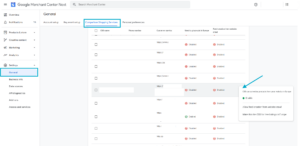
* If the Comparison Shopping Services option doesn’t appear: Go to the Business Info section and complete your Customer Service information. This should resolve the issue. If it doesn’t, please contact us.
Related Article: To understand why managing these permissions is critical for your margins, read our guide on: Cannibalization Risk


'/%3E%3C/svg%3E)

