adstrong Studio Labelizer
Stop wasting Shopping budget on products that will never convert.
The adstrong Studio Labelizer automatically segments your entire product catalogue into performance labels. So your budget flows to the products that actually sell, not the ones that burn it.
- Setup in under 5 minutes
- No developer needed
- Cancel anytime
adstrong is trusted by 1,000+ advertisers and powers over 20% CSS Centers worldwide.




























































The problem
Product feeds lack performance data for proper campaign optimization. Your budget pays for it.
No matter how clean your product data is, it lacks information on how the products perform on Google Ads. Hence you can’t optimize your Google Shopping campaigns on product-performance data.
Half your budget, wasted
Up to 50% of your Shopping budget goes to products that never convert. You are paying to advertise items that will not sell.
New products get ignored
The algorithm sticks with what it already knows. Fresh products and seasonal lines never get the impressions they need to prove themselves.
A good average hides bad spending
You set ROAS 5×. Google hits it by spending equally on a product at 8× and one at 2×. That 2× product just burned half your budget, and the average still looks fine.
Manual labeling is extremely time-consuming
The Solution
Segment your products with adstrong Labelizer and your profit will soar.
Minimise wasted ad spend
Maximise revenue
Regain control over PMax
Google Shopping runs on automation. The Labelizer gives that automation a direction. Feed Google clear product segments and guide the algorithm toward efficient bidding.
Built on the infrastructure trusted by 1,000+ advertisers across all CSS enabled countries.
How it works
From feed to labelled campaigns in three steps.
1
Connect
2
Label
3
Campaign
Export your labelled feed and use the custom labels to structure your campaigns. Google’s algorithm now knows exactly where your budget generates the biggest impact.
The labels
Every product gets a label. Labels drive your campaigns.
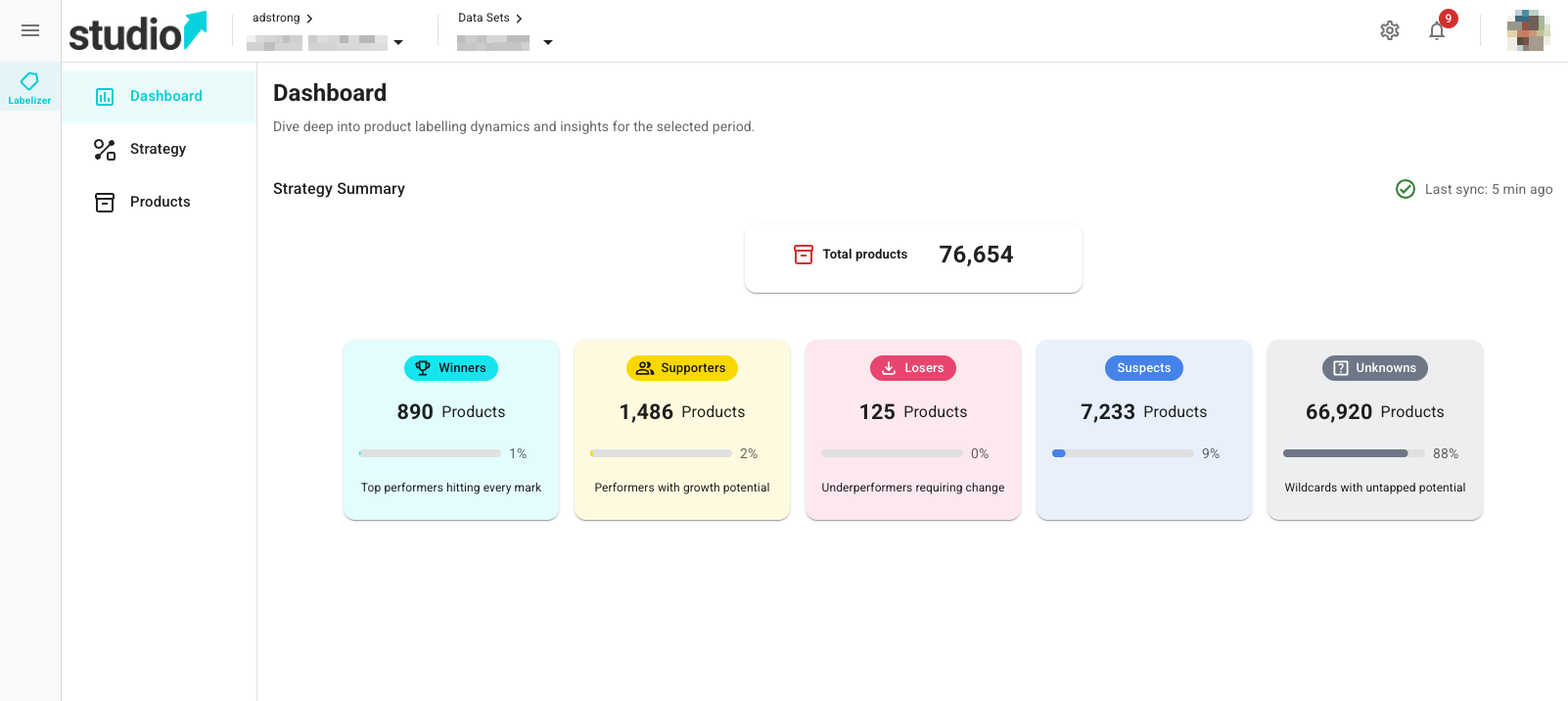
The adstrong Labelizer analyses your products daily based on two factors: click volume and ROAS. Each product is automatically assigned a label that connects straight to your Google Ads campaigns via a custom label in your feed. No manual segmentation. No spreadsheets.
Winners
Your top performers. Less than 10% of your products, but responsible for 80%+ of your revenue.
Give them the budget they deserve and push them harder.
Supporters
Products that convert well but don’t yet have enough volume. Close to Winner status.
Give them more visibility and watch them level up.
Losers
Products eating your budget without returning conversions.
Deactivate products and shift budgets towards profitable campaigns.
Suspects
Products with few clicks and low conversions. Silently burning money.
Find hidden Supporters and reduce spend on the rest.
Unknowns
Products with zero impressions & clicks. Dormant, not dead.
Decide which dormant products to optimize.
Powerful custom rules & product groups available soon.
Label rules on product groups
Assign labels to any product group using individual rules per group.
Any product group
Individual label rules
Target ROAS
Click Thresholds
Create your custom rules
Default labeling is based on clicks + target ROAS, but may not cover all cases. Add custom rules on your own KPIs and feed attributes:
Brand
Pricing / strike pricing
Profit
Shipping
Seasonality
+ more
Products move between labels automatically based on performance changes and custom rules. No manual updates needed.
Is this for you
Built for advertisers who want results, not more complexity.
Whether you manage Shopping campaigns for one brand or fifty clients, run Google Shopping or Performance Max campaigns, the adstrong Labelizer gives you the segmentation infrastructure to spend smarter from day one, and stop guessing which products deserve budget.

Features
adstrong Labelizer has every feature you need.
The adstrong Labelizer is built to run itself. Powerful enough for managing hundreds of accounts. Simple enough to set up in minutes.
Custom data sets
Select feed label sources individually or in groups. Define exactly which data drives your classification strategy.
Custom rules
Set labels flexibly based on your own logical expressions and business rules.
Flexible scheduling
Run label creation monthly, weekly, on a specific calendar day, relative to end of month, or manually on demand.
Product groups
Segments with individual strategies for specialised classification in the 5 buckets and price benchmark.
Conversion delay adjustment
Adjust the date window of your performance analysis to avoid unintended label shifting due to missing reported conversions.
In-app notifications
Get notified of successful runs and urgent issues that need your attention, directly inside the app.
Price benchmark labels
Compare your product price against Google's benchmark price. Automatically label products as above, matching, or below benchmark.
User-defined price variance
Set your own tolerance threshold for price benchmark labels. Define exactly when a product is considered above or below benchmark.
Custom label names
Rename labels to your own values. Perfect for teams switching from inferior labelizers, no campaign restructuring required.
Supplemental feed as file
Export your labels as a supplemental feed file to upload directly in Google Merchant Center. No API required.
Full mobile support
Manage and review your labels on any device. The adstrong Labelizer is fully mobile-optimised, a capability no competitor currently offers.
5-bucket classification
Winners, Supporters, Suspects, Losers, and Unknowns: a complete performance picture that clearly separates dormant products from low performers.
Automatic recommendations
AI-powered suggested values for your strategy configuration, based on your account's historical performance.
adstrong Academy
In-depth guides and tutorials to help you get the most out of the Labelizer and build a smarter Shopping strategy.
Dedicated Premium Support
Our team is here to help you set up, troubleshoot, and grow. Support is included with your plan.
Common questions
Questions, answered.
I'm already using a labelizer, can I switch to adstrong?
Yes, you can switch without any campaign disruption. The adstrong Labelizer lets you rename labels to match your existing values exactly. That means you can switch to adstrong Studio without restructuring a single campaign or losing any historical performance data.
Just map your current label names to ours or vice versa and you’re live.
How does the adstrong Labelizer compare to other solutions?
Most labelizers stop at clicks and ROAS. The adstrong Labelizer gives you five performance buckets, price benchmark labels, full mobile support, and flexible scheduling, all in one platform, with no developer required.
It’s also the starting point of adstrong Studio, which means your segmentation infrastructure grows with you as the product expands. Built on the same infrastructure trusted by 1,000+ advertisers across all CSS-enabled countries.
Do I need a developer?
No. The connection uses a Supplemental Source Feed, a standard Merchant Center feature. Setup takes about 5 minutes and needs no coding.
Does Labelizer work with Standard Shopping campaigns, or only Performance Max?
Both. Labelizer classifies products based on their performance data and writes custom labels to your feed. Those labels work in any campaign type that supports product group segmentation: Standard Shopping and Performance Max included.
How does the supplemental feed export work?
Once Labelizer has classified your products, it generates a supplemental feed file that maps each product ID to its custom label value (0–4). You upload this to Google Merchant Center as a supplemental data source, and it appends the label to your primary feed. From there, you create product groups in your campaigns using those label values. No changes to your main feed, no developer work required.
What data does Labelizer use to classify products, and how far back does it look?
Classifications are based on the performance data in your Google Ads account: impressions, clicks, conversions, and revenue. The default lookback window is 30 days, which balances recency with statistical reliability. You can adjust this between 7, 14, 30, and 60 days to fit your sales cycle or account for seasonal patterns.
How often do labels update?
Labels update on the schedule you configure. This is intentional: updating too frequently disrupts campaign learning. A manual sync is always available if you need a fresh classification sooner. Once updated, Google Merchant Center fetches the new values from your supplemental feed automatically.
Do I need to update my strategy every month?
No. The Labelizer is always-on. Labels update on your chosen schedule and when a product’s label changes, it automatically moves into the campaign that matches its new label. A Winner that drops in performance becomes a Suspect, and your campaign structure reflects that instantly, without any manual intervention.
Revisit your settings only after big changes: a new ROAS target, a major seasonal shift, or a conversion tracking issue.
Do I need to restructure my campaigns?
No. Labels are additive. They layer onto your existing setup, and you can see segmentation data before you change a single campaign.
What happens to new products that have no performance data yet?
Can I manually override a label?
Can Labelizer be used across multiple Google Ads accounts?
Yes. If you manage multiple accounts, you can run Labelizer for each one independently. Agency and multi-account setups are supported, reach out to discuss how to structure access for your team.
We are already an adstrong CSS customer.
Then adstrong Studio is your next step. Your CSS infrastructure is already connected to us, so turning on the Labelizer takes only minutes.
And as an existing customer, you qualify for an exclusive discount. Reach out to us and book a call below to get your deal.


