Future-Proof Your Google Shopping Tracking: What Google’s Own Experts Recommend
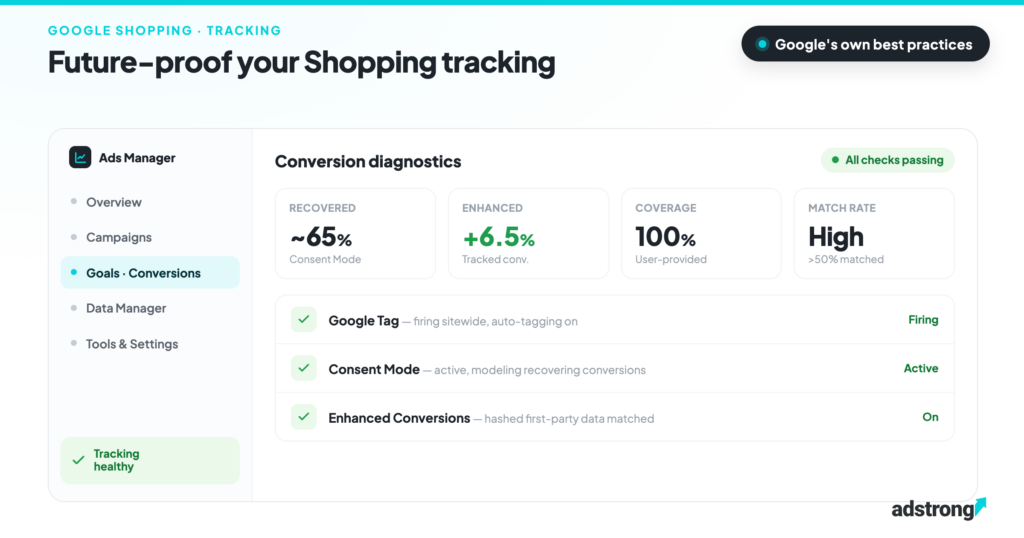
Resilient Google Shopping tracking in Europe stands on three pillars, in strict order: the Google Tag as the foundation, Consent Mode for compliance, which per Google’s team recovers about 65% of conversions from users who reject cookies, and Enhanced Conversions, which adds roughly 6.5% more tracked conversions from hashed first-party data. In a recent adstrong webinar, three Google specialists from the EMEA Shopping team walked through the full playbook; this is the write-up.
Tracking issues rarely announce themselves, they emerge as silent failures and unexplained dips in performance. Here is what to implement, in what order, and how to check each piece is actually working.
Key facts
| Claim | Number | Source |
|---|---|---|
| Conversions recovered from cookie-rejecting users via Consent Mode modeling | ~65% | Google EMEA Shopping team |
| Average uplift in tracked conversions with Enhanced Conversions for web | +5% Search / +17% YouTube | Google EMEA Shopping team |
| Threshold for conversion modeling to activate | ~700 ad clicks / 7 days | Google EMEA Shopping team |
| Time before modeling fully kicks in | ~4 weeks | Google EMEA Shopping team |
Table of contents
- Pillar 1: Google Tag
- Pillar 2: Consent Mode
- Pillar 3: Enhanced Conversions
- Bonus: what Google’s creative team is watching
- The takeaway
- Frequently Asked Questions
Pillar 1: Google Tag, the foundation everything else is built on
Every Google measurement solution, Google Ads, GA4, Tag Manager, rests on the Google Tag. The old gtag has evolved: one single Google Tag on your site can now send data to multiple destinations, so if you already have one implemented for Google Ads, you don’t need a second one for Analytics. One tag, all solutions.
The practical takeaway is tag diagnostics. In Google Ads, go to Tools → Data Manager → Google Tag to see whether your tag is firing correctly and what needs fixing. The most common issues Google’s team sees:
- Auto-tagging not enabled: without it, conversion data can’t flow back to Google and Smart Bidding is flying blind.
- Pages missing the tag: a new landing page without the tag breaks the user journey mid-funnel.
- Legacy tags (old GA or conversion tags): they still fire, but they’re not compatible with the Google Tag and you lose data. Migrate to the Google Tag or Tag Manager.
- Missing cross-domain tracking: if you run multiple storefronts (e.g. shop.it and shop.es), register them so a user switching stores counts as one journey, not two.
Pillar 2: Consent Mode, mandatory in Europe, and worth it
If you serve users in the European Economic Area, the UK or Switzerland, Consent Mode isn’t optional: since March 2024, Google requires consent signals to keep measurement, ad personalization and remarketing running. You need a consent banner that lets users accept or reject cookies, and it must be wired into your Google Tag (Firebase for apps).
What “v2” actually means. Since March 2024 the Google Tag must receive two additional consent signals: ad_user_data (may user data be sent to Google for advertising purposes) and ad_personalization (may it be used for remarketing). Any Google-certified CMP handles both automatically, but if your banner predates 2024 and was never updated, this is the first thing to check. One more distinction that matters: in basic consent mode, tags don’t fire at all until the user consents; in advanced consent mode, they send anonymized cookieless pings even on rejection. Only advanced mode feeds the conversion modeling described
Here’s what makes it more than a compliance checkbox. When a user consents, everything works as usual. When a user rejects cookies, Google still receives anonymized, aggregated cookieless pings, no private data, fully respecting the user’s choice. Those signals feed Google’s AI-based conversion modeling, which recovers conversions that would otherwise vanish from your reporting. Per Google’s team: with Consent Mode implemented, about 65% of those conversions are recovered, in line with Google’s published benchmark, which puts the figure at more than 70% of ad-click-to-conversion journeys lost to consent choices.
How to check it’s working
In Google Ads: Goals → Conversions → Summary → Diagnostics. Three things to know about the modeling:
- Modeling activates above a threshold of roughly 700 ad clicks in the last 7 days, measured per country and per domain grouping, not across your whole account. Multi-market shops need to clear it in each market.
- Once implemented, it takes around four weeks of data before conversion recovery fully kicks in.
- You can check status per individual conversion action via the Tracking status column in the conversions summary.
One important caveat: Google only processes data accompanied by consent signals. Send data without them and it’s discarded, and your measured performance degrades accordingly.
For further info: About consent mode modeling section on Google Ads Help forum.
Pillar 3: Enhanced Conversions, put your first-party data to work
Basic tracking counts conversions. Value-based bidding adds revenue. Enhanced Conversions goes one step further: it uses hashed first-party data (primarily email, plus phone number or address) to match conversions that browsers’ privacy restrictions would otherwise hide.
The mechanics: when a customer converts and provides an email address, that email is hashed and sent to Google in a privacy-safe way. Google matches it against its own signed-in user data and attributes the conversion. Google’s published figures put the uplift at +5% on Search and +17% on YouTube (many users search signed out; most YouTube viewers are signed in). The ~6.5% average cited in the webinar reflects a typical Shopping-heavy mix between the two. And it’s not just reporting: the extra signals feed Smart Bidding and improve performance downstream.
Requirements and diagnostics
- Google Tag correctly implemented sitewide.
- Consent Mode active (you serve EEA/UK users, no way around it).
- Conversion tracking set up in Google Ads (purchase at minimum; micro-conversions help too).
- First-party data available at conversion time, email is by far the highest-matching parameter.
In the diagnostics hub (Goals → Diagnostics) you’ll find a dedicated Enhanced Conversions panel. Watch two metrics: coverage (what share of your conversions include user-provided data, aim for 100%) and match rate (how much of that data Google can match, “high” means above 50%). Alerts flag the usual culprits: missing email fields, or data sent in plain text instead of hashed. For hands-on debugging, Google’s EC Assist Chrome extension inspects your implementation field by field, note it only validates tag-based setups (gtag/GTM), not server-side or API implementations.
What about adstrong? This playbook comes from adstrong’s webinar with three Google EMEA Shopping specialists, the kind of direct access a Google CSS Premium Partner has. adstrong clients get tracking and Merchant Center questions routed straight to Google’s team.
Bonus: what Google’s creative team is watching
Beyond measurement, Google’s shopping partner team pointed to where Shopping ads are heading: more personalization and conversational search behavior. Generic queries like “red dress for a winter wedding” reward advertisers whose creative matches the descriptor, lifestyle imagery over plain product shots, and tools like Product Studio make that fast to produce at scale. Further out: visual try-on and 3D shopping experiences are the space to watch.
The takeaway
Three pillars, in strict order: the Google Tag as the foundation, Consent Mode to stay compliant and keep ~65% of rejected-cookie conversions visible, and Enhanced Conversions to recover what privacy restrictions hide, roughly 6.5% more tracked conversions feeding your bidding algorithm. All three come with built-in diagnostics in Google Ads. Check them before your performance dips, not after.
Frequently Asked Questions
What is Consent Mode and is it mandatory?
For traffic from the EEA, the UK and Switzerland it is mandatory since March 2024 (the “Consent Mode v2” requirement): Google discards conversion data sent without consent signals.
How many conversions does Consent Mode recover?
Per Google’s EMEA Shopping team, conversion modeling recovers about 65% of the conversions from users who reject cookies, anonymized and aggregated, with no private data involved.
What uplift do Enhanced Conversions deliver?
An average of +5% Search / +17% YouTube more tracked conversions, per Google’s team, lower on Search, higher on YouTube where most users are signed in. The extra signals also feed Smart Bidding, improving delivery beyond reporting.
Why isn’t my conversion modeling working?
The two usual reasons: your account is below the ~700 ad clicks in 7 days threshold (counted per country and domain grouping), or the implementation is younger than the ~4 weeks the modeling needs. Check status under Goals → Conversions → Summary → Diagnostics.
How do I check my Enhanced Conversions setup?
In the Google Ads diagnostics hub, watch coverage (share of conversions with user-provided data, target 100%) and match rate (above 50% counts as high). Google’s EC Assist Chrome extension debugs the implementation field by field.
Want the full webinar, or a direct line to Google?
As a Google CSS Premium Partner, adstrong works directly with Google’s EMEA Shopping team.

Pietro Calafiore
Pietro Calafiore is Digital Marketing Manager at adstrong, the Google CSS Premium Partner powering Google Shopping and programmatic growth for merchants and agencies across Europe. He focuses on campaign performance and feed optimization to help brands get the most out of Google Shopping. Meet the team
'/%3E%3C/svg%3E)